Verify an app through the operator’s established website and its matching official store listing before installing it. Check the publisher, support domain, privacy policy and requested permissions. A casino logo, search-ad placement or home-screen icon does not establish authenticity, and an authentic app does not establish permission to gamble in your province.
CasinoJure has not verified a Canadian App Store or Google Play listing for Slots Gallery or Boho. We made a limited public access observation, documented below. It did not reach either casino interface and is not a mobile usability review, installation test or account-access check.
Know which mobile product you are looking at
| Format | What it is | Evidence to request |
|---|---|---|
| Mobile website | A site opened in a phone’s browser | Verified domain, accessible terms and location eligibility |
| Home-screen shortcut or web app | A website launched from a saved icon | The underlying web address and browser installation details |
| Native application | Software installed for the phone’s operating system | Matching publisher, official store listing, privacy details and supported region |
On smaller screens, scroll horizontally to view the full table.
Apple documents adding a website to the iPhone Home Screen. That explains why an icon can open a website without proving that a separately developed casino application exists. Describe the product accurately rather than treating every icon as a native app.
A practical authenticity check
- Establish the operator and website first. Use the relevant regulator’s directory where available. A familiar spelling or brand image alone is insufficient.
- Look for an operator-provided store link. If none is published, ask verified support whether a native app exists for your device and location. Do not fill the gap with a file from a download blog.
- Compare the listing details. Record the publisher, support website, privacy-policy domain and store region. A different legal name might have an explanation, but ask for it before installation.
- Inspect privacy and permissions. Identify what information is requested and why. If the explanation is missing, stop and ask rather than granting access indiscriminately.
- Keep device protections enabled. Do not disable security checks, install an unfamiliar management profile or change your apparent location to make a download work.
Canada’s Get Cyber Safe guidance recommends trusted download sources and reviewing app permissions against their purpose. The Canadian Centre for Cyber Security also cautions that store-distributed apps can present risks. A store presence is one check, not an absolute guarantee.
Interpret permissions in context
A permission needs a functional explanation. For example, a camera request during a clearly identified document-capture step is a different situation from an unexplained request to read contacts. A location request may relate to geographic checks. Neither automatically proves the entire application trustworthy.
Ask what data is collected, when it is needed and which company handles it. If you decline a permission, some features may not work. That is a reason to seek a clear explanation, not to bypass location or identity requirements. Avoid uploading identification until you have verified both the destination and the account process.
Apple describes App Store privacy labels and reporting options. Google explains Play Protect’s checks and warnings. Keep those protections enabled and investigate a warning instead of treating it as an obstacle to click through.
Our limited public access observation: 15 October 2026
CasinoJure opened each operator’s public terms URL in a desktop browser using a responsive viewport of 390 by 844 CSS pixels. The visible result for both was a region-unavailable screen. The screenshots record that result; they do not establish what a visitor in a Canadian province would see.
| Public URL | Visible result | What remained untested |
|---|---|---|
| slotsgallery.com/terms-and-conditions | Region-unavailable screen | Casino interface, Canadian access and native app ownership |
| bohocasino.com/terms-and-conditions | Region-unavailable screen | Casino interface, Canadian access and native app ownership |
On smaller screens, scroll horizontally to view the full table.
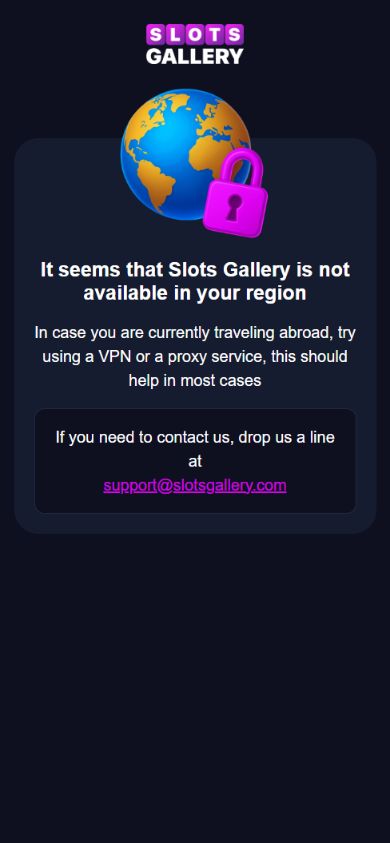
We did not register, deposit, test a game, install an app or use a VPN. The viewport width was checked in the browser; an actual phone was not used. The appropriate conclusion is that this public attempt was blocked, with the wider experience unverified.
What a public mobile access check can establish
You can inspect several useful details without creating an account: whether the page loads, whether the full terms can be read, whether the operator’s identity is visible, and whether support and responsible-gambling information are accessible. Record only what you actually observe.
| Record | Example of a precise entry |
|---|---|
| Device context | Actual phone and operating system, or desktop browser with a narrow viewport |
| Access route | Starting URL and final visible domain |
| Date and location | Observation time, time zone and country used for the check |
| Observed result | Public terms accessible, login required, or region-unavailable notice |
| Untested features | Registration, location approval, deposits, game performance and withdrawals |
On smaller screens, scroll horizontally to view the full table.
A desktop window made narrower is not an actual iPhone or Android test. A public page loading is not a successful registration. An access block is an observation about that attempt, not proof that every Canadian visitor will see the same result.
What if the site or store says unavailable?
Stop at the restriction. Check the operator’s current eligibility rules and your province’s authorized options. Do not use a VPN, a new store region, a mirror found in a forum or another person’s account to work around it.
Ask support for a public statement of availability and the official download route, if any. Preserve the response with its date. If support cannot establish an authentic listing, leave native-app availability unverified. There is no need to install an unofficial package merely to finish a comparison.
If you already installed something suspicious
Do not provide additional account, payment or identity details through it. Use your device’s official security guidance to review the application and its permissions. Change affected credentials through a separately verified route if you believe they were exposed, and contact your payment provider if you entered payment details into an untrusted destination.
Preserve the store or download URL, publisher details and any relevant messages for a report. Apple’s support page links to its problem-reporting service; Google’s guidance explains Play Protect alerts. Do not publish personal identification in a public app review.
Where the Canada partner pages fit
The Slots Gallery Canada and Boho Canada pages collect dated source notes and unresolved campaign details. They do not certify a mobile app. The Canada research hub also separates CAD support from provincial authorization. Ontario routes remain unavailable pending eligibility verification; use the official Ontario directory.
Source review: 15 October 2026. No application was installed or authenticated for either partner. No deposit, account approval, mobile game or payout was tested. Download availability and device interfaces can change.
Sources and research notes
Review notes dated 15 October 2026. Source-check dates are listed separately; operator terms can change. Worked examples are hypothetical.
- Government of Canada Get Cyber Safe: phones and tablets — source check: 2026-10-15
- Canadian Centre for Cyber Security: mobile-device security — source check: 2026-10-15
- Apple: maintaining a safe App Store experience — source check: 2026-10-15
- Apple: website bookmarks and Home Screen access — source check: 2026-10-15
- Google: Play Protect app checks and warnings — source check: 2026-10-15
- iGaming Ontario regulated-site directory — source check: 2026-10-15